Ready to use the Map feature in Calendar Views? When mapping Activities for the day, there are three options to choose from to set as the Start. An Assignee Address, the Shop Default Start Location, or a one-time Custom Address.
This article details how to set up a Shop Default Start Location. The location can be modified at any time, or deleted. There can only be one Shop Default Start Location.
Mapped routes will use an Assignee address first if one has been entered. If no Assignee addresses have been entered, routes will be mapped automatically from the Shop Default Start Location. Entering a one-time Custom Address will ignore both saved Assignee addresses and the Shop Default Start Location.
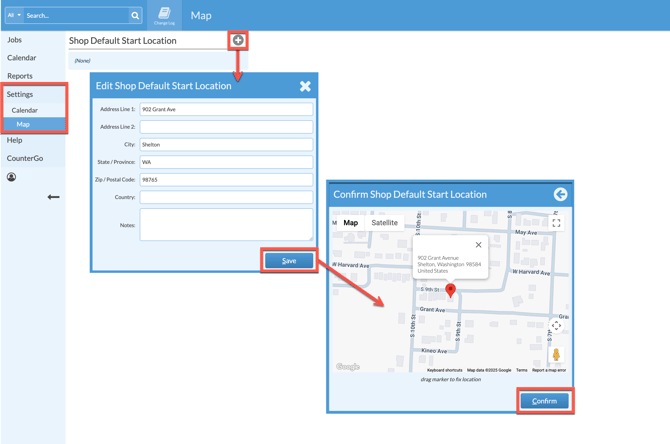
ADD A START ADDRESS
- Go to Settings > Calendar > Map.
- Click the Add icon > Enter a new address.
- Save > Confirm the address.
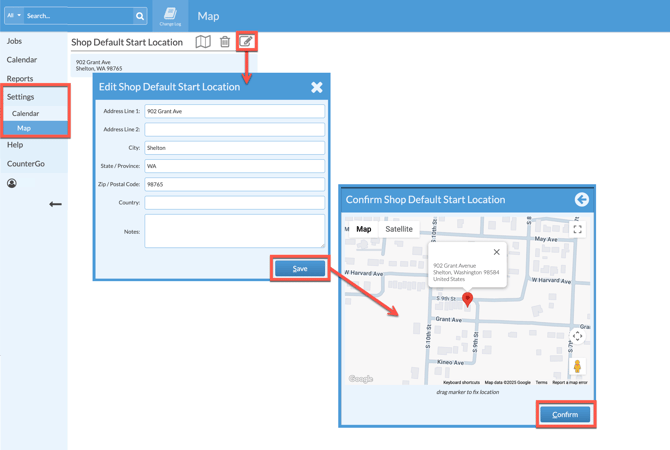
EDIT A START ADDRESS
- Go to Settings > Calendar > Map.
- Click the Edit icon > Make any changes.
- Save > Confirm the address.
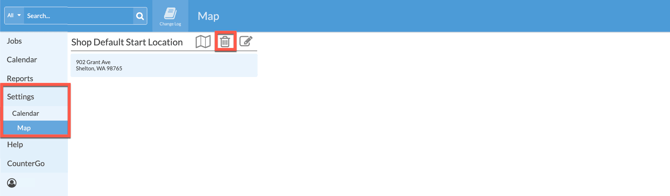
DELETE A START ADDRESS
- Go to Settings > Calendar > Map.
- Click the Delete icon to remove the current Shop Default Start Location.